Memory for AI agents

Stop re-explaining the context in every new chat.
Give your AI agents real long-term memory.

Watch the demo first

What it is

What is MaxGraph

MaxGraph is a local graph memory database with a live visual interface. Your agents (Claude, DeepSeek, Kimi, Cursor) remember project architecture, decisions and tasks forever — pulling only the facts they need, without burning extra tokens.

Works with your agent
ChatGPT Claude Gemini Copilot Cursor

How it works

Nothing new to learn

You work with your agent as usual. Memory appears on its own, in the background.

  1. 01

    You chat and write code — the agent records

    Decisions, bugs, facts and current tasks from the chat land in memory instantly — no need to ask it to remember.

  2. 02

    All files stay on your computer

    Every record can be opened and checked in the live dashboard.

  3. 03

    Started a new chat? No need to explain again

    The agent automatically gets a context brief: your decisions verbatim, open tasks, outcomes of past sessions. You start where you left off.

Advantages

MaxGraph advantages

  1. Records live apart from the chat

    They stay on your PC — surviving closing, deletion, and any number of context compactions.

  2. Writes the moment a fact happens

    Decisions and bugs land in memory instantly. If the session dies a minute later — everything is already in place.

  3. A fresh brief at session start

    Your decisions verbatim and the actual outcomes of past sessions — wording never drifts through retelling.

  4. Unfinished work resurfaces on its own

    Open tasks and bugs remind you of themselves at the next launch, no extra prompts needed.

  5. You always see what happened

    A live dashboard, a relation map, and a dated journal to quickly restore the thread of work.

  6. The chat fills up more slowly (~43% token savings)

    Project history no longer rides in every message — the context window stays clean longer.

Demo

See your project’s memory
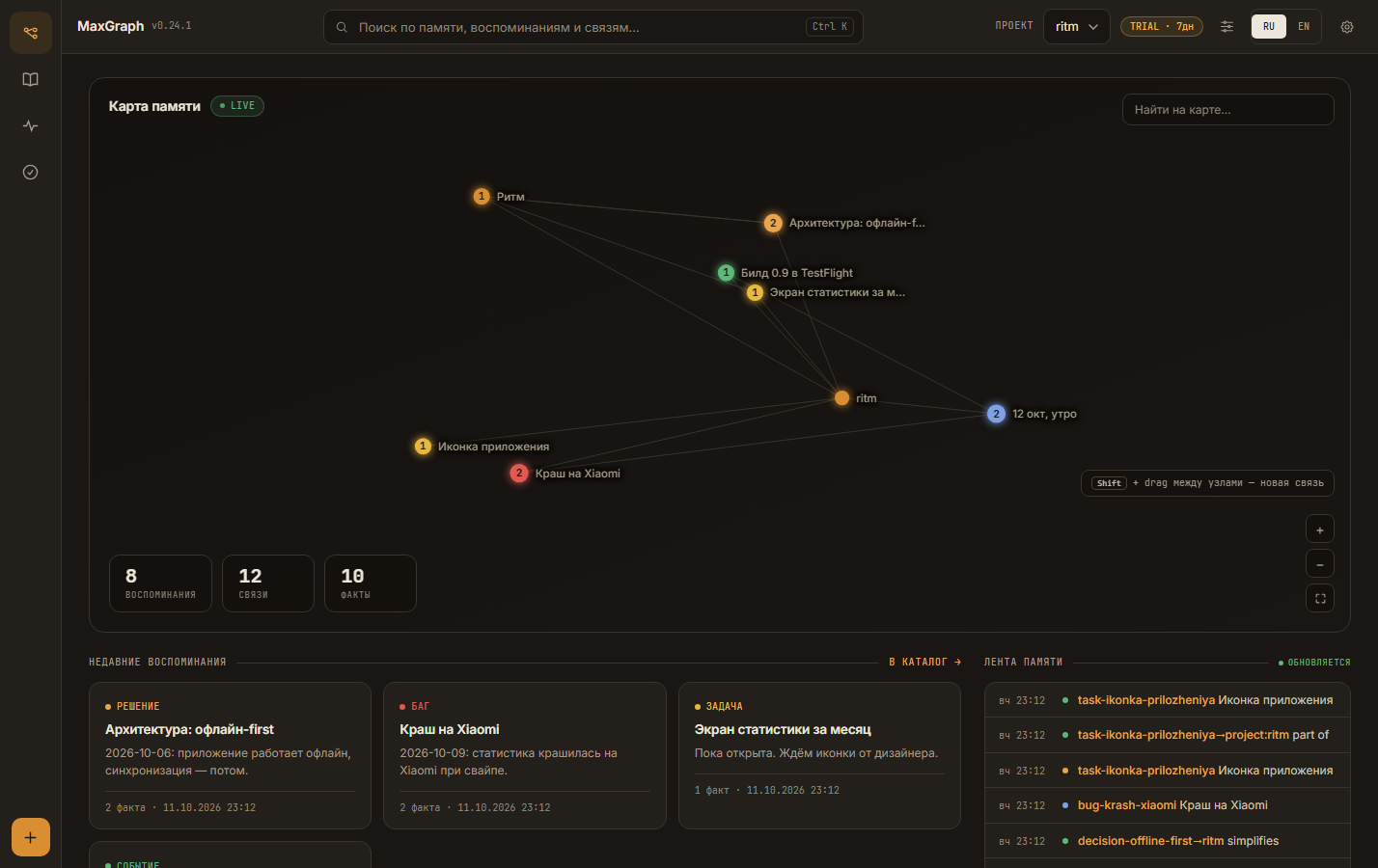
MaxGraph dashboard: memory map of the Ritm project, record feed and search

This is the dashboard — a window into your agent’s memory. Every dot on the map is a record: a decision, a bug, or a task from your chats. Look inside any time to check what it remembered.

Install

Just ask your agent to install MaxGraph

Copy the text and paste it into your agent’s chat — it will set up everything itself.

Prompt for your agent
Install MaxGraph (memory for our work together): https://github.com/RuMemory/maxgraph. Add the MCP server, start the dashboard, and tell me when everything is ready.
You don’t need to install anything by hand — your agent sets up everything, including Docker. The 7-day trial turns on by itself on first launch, no card needed.

Pricing

One plan, everything included

7 days free, no card. The trial is built in and turns on by itself on first launch.

MaxGraph Pro
  • 01Dashboard. All memory in front of you: map, feed, search.
  • 02Memory. The agent remembers decisions, bugs, tasks, and agreements on its own.
  • 03Search. Finds what you need in seconds, even what was discussed a week ago.
  • 04Export. All data in NDJSON in one click, nothing is locked in.
  • 05Feed. A feed of records: what was saved and when. Always there to check.
Term

FAQ

The essentials, briefly

Memory for AI agents. MaxGraph remembers what you and your agent decided and did, and finds it in later sessions. Everything lives on your machine, and every record is visible in the dashboard.

ChatGPT, Claude, Gemini, Copilot, Cursor, Kimi, DeepSeek Harness, and any client with MCP support. Connecting takes one prompt — copy it from the Install section above.

On your machine. Your records never leave it. Internet is needed once for activation; after that everything works offline.

Recording new facts will stop. The dashboard, search, and export stay available with no time limit: the memory you accumulated stays with you.

Export to NDJSON with one button in the dashboard. It’s a plain text format — any text editor opens it.

No. Search runs inside your MaxGraph, on your machine — texts never leave it. You can turn search off completely.

Built-in memory is tied to one service and lives on its servers. MaxGraph works with any agent, and your records stay on your machine, readable in any text editor.

Try it

Your agent takes it from here

Copy the prompt and paste it into your agent’s chat. 7 days free, no card. Your records stay with you even if you don’t renew.

See pricing