Short version: MCP (Model Context Protocol) is an open protocol that Anthropic introduced in late 2024. It defines one standard way to plug external tools and data into an AI application: a server declares what it can do (tools, resources, prompts), and a client consumes that. Before MCP, every “model + service” pair was wired by hand; now a server is written once and works with every MCP client.
The problem MCP closed
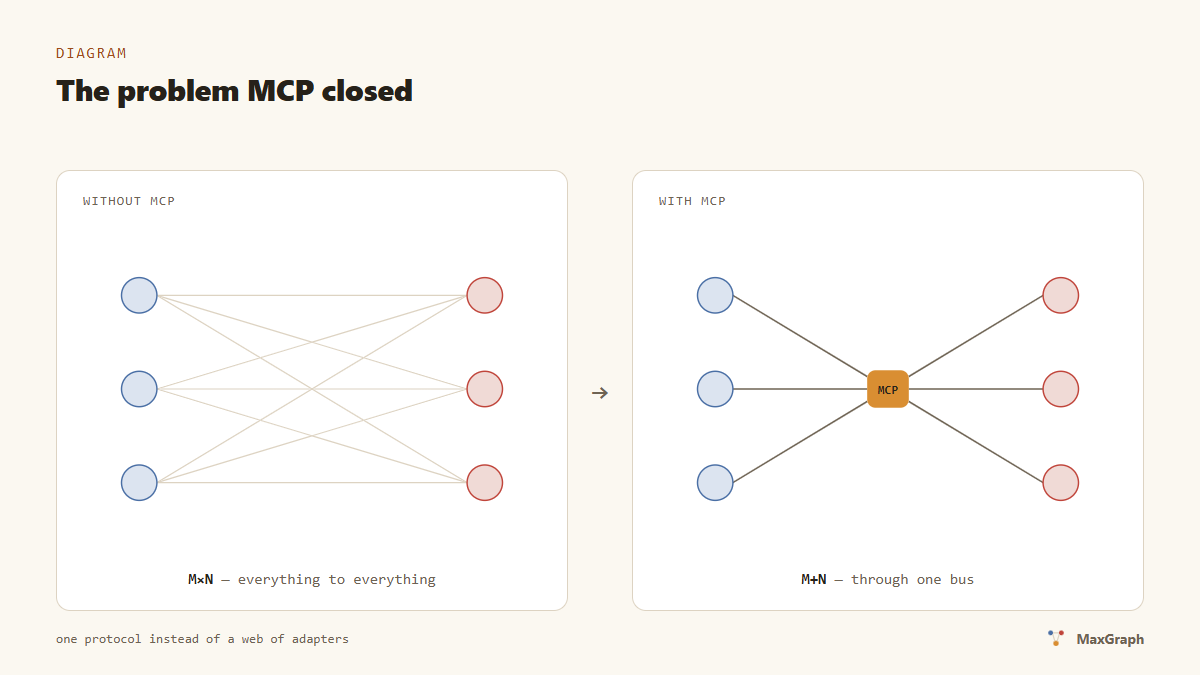
Until November 2024, connecting an agent to the outside world looked like this: every service had its own API, and every client had its own function-calling format. M clients times N services make M×N integrations, each one hand-written. Want Claude to talk to GitHub — write a shim. Want the same for Cursor tomorrow — write a second one.
Anthropic’s move was to remove the multiplication: a service implements an MCP server once, an application implements an MCP client once, and after that any client works with any server. Anthropic itself called it “USB-C for AI applications” — the analogy stuck because it’s accurate.
The protocol is open: the specification and SDKs live on GitHub under the modelcontextprotocol organization. Under the hood it’s JSON-RPC 2.0 — requests, responses and notifications in UTF-8.
The spec keeps moving: the first revision shipped in November 2024, in spring 2025 the HTTP+SSE transport was replaced by streamable HTTP, and OAuth authorization plus smaller primitives came later. For a user this means one thing: year-old guides may describe mechanics that have already been replaced — check against the current spec.
What an MCP server offers
A server exposes three primitives to the client:
- Tools — functions the model can call:
search_nodes,create_issue,deploy. Each has a name, a description and a JSON schema for its parameters; the description is how the model decides when the tool fits. - Resources — data addressed by URI:
file:///…, a document, a record. Resources are picked by the application or the user, not by the model directly. - Prompts — ready-made request templates the user invokes from the client’s interface.
That covers almost any integration: “memory” is read and write tools, “file access” is resources, “review this code against a checklist” is a prompt.
Two transports: stdio and streamable HTTP
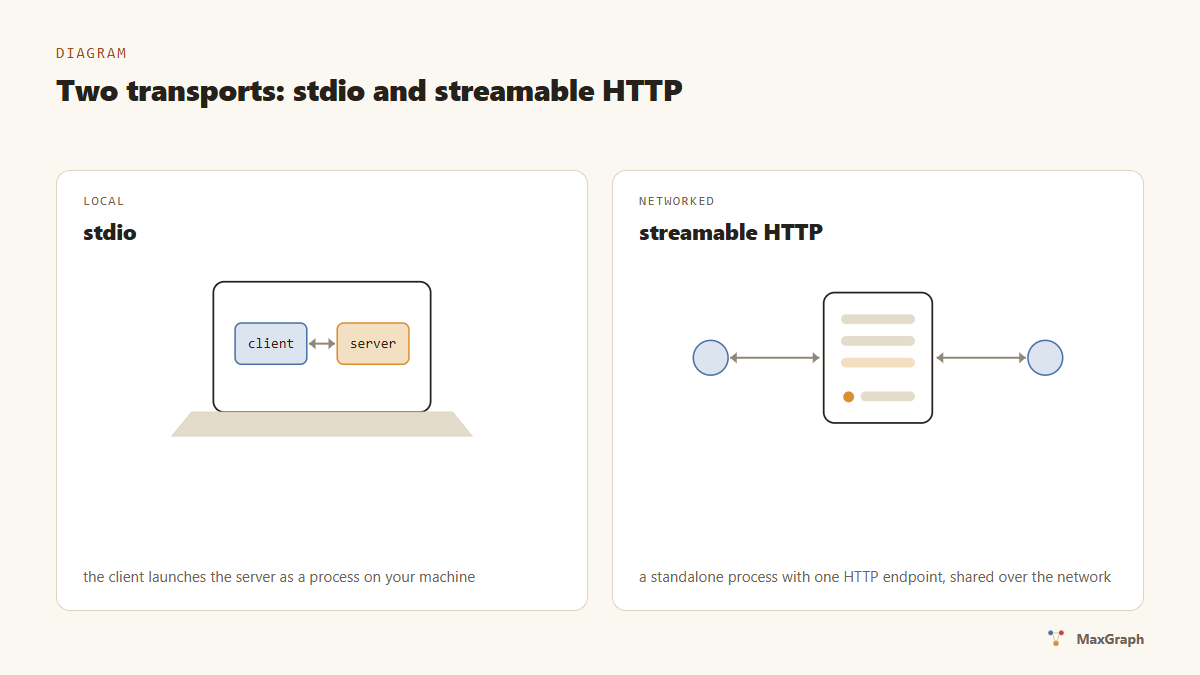
The specification defines exactly two standard transports.
stdio. The client launches the server as a child process and talks to it over stdin/stdout: JSON-RPC messages delimited by newlines. Local, fast, no network — this is how command-style servers like npx -y @modelcontextprotocol/server-filesystem work. The flip side: the process lives on your machine with your account’s permissions.
Streamable HTTP. The server is a standalone process with a single HTTP endpoint (POST and GET on the same path, e.g. /mcp), optionally using SSE for streamed responses. This transport replaced the original HTTP+SSE from the first spec revision. It fits remote servers and shared team instances; for authorization the spec builds on OAuth 2.1.
The selection rule is simple: your own tool on your own machine — stdio; someone else’s service or a shared one — streamable HTTP. Our MaxGraph runs over streamable HTTP: a server in Docker, clients connecting by URL.
The ecosystem: clients, servers, the registry
Two years in, the protocol is no longer “a Claude thing”. Clients with MCP support: Claude Desktop and Claude Code, Cursor, VS Code, Windsurf, Zed; in 2025, ChatGPT and Gemini added support too.
There are thousands of servers: filesystem, GitHub, Postgres, Slack, a browser, Figma. To navigate them there’s the official registry (registry.modelcontextprotocol.io, opened in preview in September 2025) and community lists like awesome-mcp-servers. The reference monorepo modelcontextprotocol/servers has passed 91,000 stars — the most starred repository in the ecosystem as of October 2026.
Worth saying separately what MCP is not. It’s not an agent framework and not a way to “make the model smarter”: the protocol doesn’t decide when or why to call a tool — that’s still on the model and your instructions. MCP answers exactly one question: how a client and a server come to terms with each other.
What connecting looks like
One JSON fragment. For Claude Code, wiring up a local memory server looks like this:
{
  "mcpServers": {
    "maxgraph": {
      "type": "http",
      "url": "http://localhost:8787/mcp",
      "headers": { "Authorization": "Bearer YOUR_TOKEN" }
    }
  }
}
Save it as the project’s .mcp.json, restart the client — the server’s tools are now available to the agent. A detailed walkthrough for Claude Code and Cursor, including the six most common mistakes, is in our tutorial.
Where memory fits in
MCP is transport, not a use case. But one use case turned out to be the main one for us: long-term agent memory. A memory server over MCP is a process that stores a knowledge graph and hands the agent tools like session_start and add_observations. That’s exactly the kind of server we build, and this whole blog is essentially about what happens once an agent has memory. More in the agent memory guide.
FAQ
Is MCP only about Claude? No. The protocol is open; besides Claude it’s supported by Cursor, VS Code, Windsurf and Zed, and since 2025 by ChatGPT and Gemini. A server written for MCP works with all of them.
How is MCP different from a regular REST API? REST is a contract between services, written for a programmer. MCP is a contract between a service and a model: the server itself publishes tool names, parameter schemas and descriptions so the model understands when and why to call them. Under the hood, the HTTP transport is plain HTTP.
Is it safe to give an agent tools? A tool runs with the permissions of whoever launched it: a stdio server runs with your user account’s rights, an HTTP server with the rights of its token. The rules are the same as for any code: install servers from sources you trust and grant no more access than needed.
How do I write my own MCP server? Official SDKs exist for TypeScript and Python, with community SDKs for most popular languages. A minimal server means declaring a couple of tools and standing up a transport; from there, read the spec.
What’s next
- Hands-on: connecting MCP servers to your agent in 10 minutes.
- A real-world example: give Claude Code memory between sessions.
- Why it matters in tokens: we measured the cost of repeated context.
Give your agent memory
7-day trial, no card. Installation is one prompt — your agent does the rest.